

Supported products
Supported AI clients
Claude Code handles large tool sets through deferred schema loading—tool schemas are fetched on demand when they match a query, preventing context window bloat. Other clients require tool filtering via the
GCORE_TOOLS environment variable to reduce the number of exposed tools.
How it works
Requests are written in plain language—no fixed commands or syntax required. The AI client reads the available tool names and descriptions, matches them to the request, calls the appropriate tool, and returns the result in a readable format. Requests can be written in any language. For multi-step operations, the server chains tool calls automatically. A request like “Create a VM with a standard configuration” triggers the server to look up available regions, flavors, and images, present a summary for confirmation, and then provision the instance.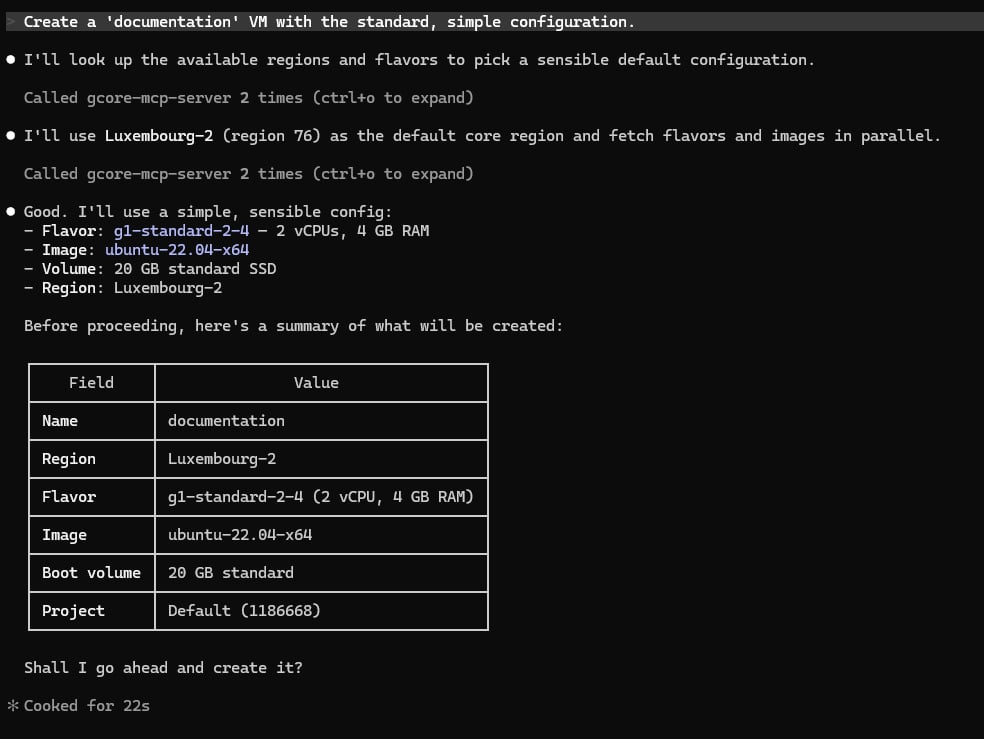
Get started
To set up Gcore MCP Server:- Install and configure Gcore MCP Server — set up the server with Claude Code or Cursor IDE
- Test tools with MCP Inspector — explore available tools in a browser interface
- Filter tools with GCORE_TOOLS — limit exposed tools for specific workflows
A Gcore API token with appropriate permissions is required. See API token permissions for guidance on required roles.
API token permissions
The API token must have permissions matching the tools being used. Gcore uses role-based access control:
For full access across all products, use an API token with the Administrators role. For restricted access, create tokens with only the roles needed for specific operations.